
Automotive and Driving: Practical Tools, Calculators and Equipment for Smarter Vehicle Ownership
From tire pressure and vehicle diagnostics to mileage, navigation, dash cams and performance data, modern driving involves far more information than simply watching the speedometer. Understanding the numbers behind your vehicle can make maintenance, troubleshooting and journey planning considerably easier.
Start With the Numbers Behind Your Vehicle
Cars and trucks operate through interconnected mechanical, electrical and electronic systems. Many of the figures drivers encounter have a direct relationship with vehicle operation. Tire diameter can affect effective gearing, gear ratios influence engine speed, and distance and time determine average speed.
For mechanical calculations involving gearing and vehicle setup, use the Automotive Mechanic & Gear Ratio Calculator . It provides a practical starting point when examining automotive gearing and related mechanical calculations.
Drivers, technicians and students interested in the underlying principles can also explore Mechanic & Automotive Trades and the broader Physics & Engineering resources on Calculation Portal.
Tire Pressure and Portable Inflation
Correct tire inflation is one of the simplest routine checks a driver can perform. Rather than relying on how a tire looks, pressure should be checked with an appropriate gauge and compared with the vehicle manufacturer’s specified cold-tire pressure. This information is commonly shown on the vehicle information placard or in the owner’s manual.
Portable inflators make pressure adjustments more convenient. Compact cordless models are useful for emergency kits and occasional top-ups, while larger portable compressors can be better suited to frequent use, larger tires or garage environments.
When comparing inflators, consider more than maximum PSI. Power source, inflation speed, duty cycle, hose length, gauge readability, portability and automatic pressure shut-off may be more relevant in everyday use.
Vehicle Diagnostics Have Become More Accessible
Modern vehicles continuously monitor numerous electronic systems. When a fault is detected, diagnostic trouble codes can provide an important starting point for investigation. An OBD-II scan tool allows a driver or technician to retrieve diagnostic information instead of relying solely on an illuminated warning lamp.
Entry-level scanners concentrate primarily on standard OBD-II powertrain information. More advanced tools may provide access to ABS, airbag, transmission, TPMS and manufacturer-specific modules on compatible vehicles. Some professional-style scanners also support active tests, service resets, relearn procedures and live-data graphing.
Bluetooth scanners can be particularly convenient for drivers who want to use a smartphone for code reading, live gauges and trip information. Dedicated handheld diagnostic tablets, meanwhile, may provide a broader service workflow for advanced DIY work and professional environments.
TPMS and Tire-Service Diagnostics
Tire Pressure Monitoring Systems add another electronic layer to modern tire maintenance. A TPMS warning can indicate low pressure, but servicing the system may also involve sensor identification, activation, relearn procedures or replacement-sensor programming.
Dedicated TPMS tools are designed for these more specialized tasks. They can be particularly useful to technicians, tire-service businesses and serious DIY users maintaining several vehicles. Capabilities vary considerably, however, so compatibility should always be checked before purchasing a tool or replacement sensor.
If your work combines mechanical and technical calculations, browse the wider Engineering Calculators section for additional tools covering engineering and trade-related problems.
Battery, Starting and Charging-System Checks
A vehicle that struggles to start does not automatically have a bad battery. Starting problems can involve the battery, starter, alternator, electrical connections, parasitic loads or other components.
A suitable battery tester can provide useful information about battery condition and, depending on the instrument, may also assist with cranking and charging-system checks. This can be particularly useful before winter, before a long road trip or when returning a stored vehicle to regular use.
Calculate Distance and Mileage Before a Journey
Automotive calculations are useful away from the workshop too. Distance and mileage influence journey planning, fuel requirements, travel time and the overall amount of driving associated with a regular commute or repeated trip.
Visit Practical Distance & Measurement for related resources, or use the Distance & Mileage Mapping Tool when working with journey distances and mileage.
Once the total distance is known, it can become the basis for further calculations involving estimated fuel consumption, travel time, servicing intervals and running costs.
Speed, Distance and Motion
Driving provides a practical example of fundamental physics. Average speed, distance and elapsed time are directly related, and the same principles extend into acceleration, velocity and other forms of motion analysis.
For calculations involving motion, visit Kinematics, Speed, Velocity & Acceleration or use the Kinematics & Motion Calculator .
These calculations are useful for education, engineering and analysis. They should not be interpreted as encouragement to exceed legal speed limits or operate a vehicle unsafely.
Choosing Automotive Tools That Fit the Job
The most expensive automotive tool is not automatically the most appropriate one. Start by identifying the specific problem you need to solve. A driver who occasionally checks tire pressure has very different requirements from a technician programming TPMS sensors, while someone investigating an engine warning light may not require the same diagnostic platform as a workshop performing bidirectional tests across multiple vehicle systems.
Consider compatibility, power requirements, portability, software updates, ongoing costs and the information the tool can actually provide. For electronic diagnostic equipment in particular, confirm support for the vehicle and required function rather than assuming that every advertised feature works with every make and model.
Most importantly, combine equipment with understanding. A pressure gauge becomes more useful when you know the manufacturer’s specified pressure. A scan tool becomes more useful when trouble codes and live data are interpreted correctly. Navigation data becomes more useful when mileage is considered in the context of the complete journey.
Useful Calculation Portal Resources for Drivers
Automotive questions often overlap with engineering, physics, measurement and everyday calculations. These sections provide useful starting points for exploring the numbers behind vehicle operation and travel.

CalculationPortal Automotive & Driving Guide
20 Useful Automotive Tools for Drivers & Road Trips
A practical selection of tire inflators, diagnostic tools, TPMS equipment, navigation devices, dash cams and driving-analysis hardware. Compare what each product is designed to do, the specifications that matter, and the type of driver or workshop it best suits.
Affiliate disclosure: As an Amazon Associate I earn from qualifying purchases. Product availability, specifications and seller listings can change; verify current details on Amazon before purchasing.
How to use this guide
Start with the job you need to solve rather than the longest feature list. A compact inflator is about convenience, while a garage compressor prioritizes speed and duty. Likewise, a Bluetooth OBD-II adapter is excellent for routine diagnostics and data logging, whereas a bidirectional tablet or TPMS service tool is intended for deeper service workflows.
What we focus on
Each entry highlights the supplied core features, practical best-fit use, relevant specifications, and an ownership tip. Amazon buttons open a search for the exact model instead of relying on one product listing, helping you find current listings if an individual ASIN changes or disappears.
Tire Inflation & Roadside Air
These four choices range from highly portable emergency inflation to faster cordless and higher-capacity solutions for regular tire maintenance.

Airmoto Portable Tire Inflator
A compact cordless inflator aimed at drivers who want an easy-to-store tool for routine pressure corrections and roadside top-ups without connecting a compressor to the vehicle.
Best for: Commuters, small-car owners and road-trip kits where compact storage and cordless operation matter most.
Key features
- Inflation capability up to 120 PSI.
- Integrated digital pressure gauge for at-a-glance readings.
- Set a target pressure and use automatic shut-off to reduce over-inflation risk.
- Rechargeable cordless format avoids routing a cable from the vehicle.
- Selectable PSI, BAR, kPa and KG/CM² units, plus an integrated LED light.
Specifications at a glance
Practical tip
Use it primarily for pressure maintenance and emergency top-ups. Check tire pressure when the tires are cold and use the pressure specified by the vehicle manufacturer—not the maximum pressure molded into the tire sidewall.
Search link • current sellers and availability may vary
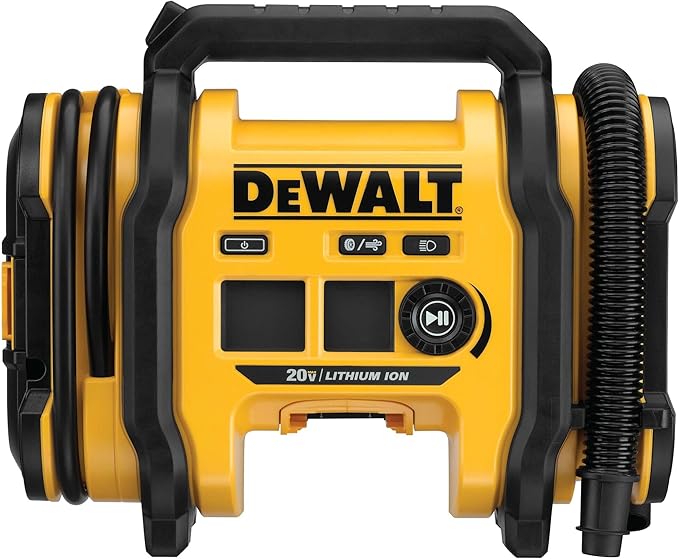
DEWALT DCC020IB 20V MAX Inflator
A versatile inflator for drivers and tool users who value multiple power options. Its high-pressure and high-volume modes make it more adaptable than a tire-only emergency inflator.
Best for: Garages, pickups, worksites and DEWALT 20V MAX users who want one inflator for vehicle tires and higher-volume inflatables.
Key features
- Digital target-pressure selection for repeatable tire inflation.
- Automatic shut-off once the selected pressure is reached.
- Separate high-pressure and high-volume operating modes.
- Supports 20V battery, 12V DC or 110V AC power options.
- Integrated LED light and onboard storage for accessories.
Specifications at a glance
Practical tip
Choose the high-pressure outlet for tires and the high-volume function for suitable inflatables. If buying specifically for cordless use, confirm the Amazon listing includes the battery/charger configuration you need.
Search link • verify package contents before purchase

VIAIR EVC88P Digital Portable Compressor
A vehicle-focused portable compressor with a long hose and digital pressure control, making it particularly useful where reaching larger vehicles’ tires comfortably is a priority.
Best for: SUV and light-truck owners who want a portable compressor with generous hose reach and preset-pressure convenience.
Key features
- Maximum working pressure of 120 PSI.
- Digital gauge for clear pressure monitoring.
- Preset desired pressure with automatic shut-off.
- 16-foot air hose for easier access around longer vehicles.
- LED work light and durable brass twist-on tire chuck.
Specifications at a glance
Practical tip
For a large SUV or truck, position the compressor so the hose reaches all four tires without being stretched. Thread the chuck squarely onto the valve stem to minimize leakage while connecting.
Search link • compare current seller configurations

Milwaukee 2848-20 M18 Inflator
A higher-pressure cordless inflator built around Milwaukee’s M18 battery platform, with automatic pressure checking and multiple presets for repeat tire-service tasks.
Best for: Frequent tire maintenance, light trucks and existing M18 users who prioritize cordless speed and repeatable preset pressures.
Key features
- Inflation capability up to 150 PSI.
- TrueFill system automatically checks pressure during inflation.
- Automatic shut-off at the selected target pressure.
- Four memory slots for commonly used PSI presets.
- Optimized for passenger-car and light-truck tires.
Specifications at a glance
Practical tip
Save presets for vehicles you service repeatedly, but verify the door-jamb pressure placard whenever tire size, load requirements or vehicle setup changes. Check whether the listing is tool-only or bundled with an M18 battery.
Search link • battery bundles may differ
Diagnostics, TPMS & Battery Testing
From phone-based OBD-II readers to bidirectional diagnostic tablets and dedicated TPMS service tools, these products cover very different levels of vehicle troubleshooting.

Autel MaxiTPMS TS508WF
A dedicated TPMS service tool for checking sensor information, carrying out relearn procedures and programming compatible Autel MX-Sensors rather than relying on a general-purpose code reader.
Best for: Tire service, seasonal wheel swaps and serious DIY users who regularly diagnose or replace TPMS sensors.
Key features
- Activates and reads known compatible TPMS sensors.
- Supports vehicle-specific TPMS relearn procedures where available.
- Programs compatible Autel MX-Sensors.
- Displays sensor ID, battery status and tire-pressure data where supported.
- Wi-Fi connectivity for software updating.
Specifications at a glance
Practical tip
TPMS functions vary by vehicle and sensor type. Confirm year/make/model coverage and the required relearn method before buying sensors or beginning a wheel change. *Displayed data depends on vehicle/sensor support.
Search link • confirm vehicle and sensor compatibility

Innova 5610 OBD2 Bidirectional Scan Tool
A handheld diagnostic tool positioned above basic code readers, adding broader system access, OEM live data and bidirectional testing for supported vehicles.
Best for: Experienced DIY mechanics and technicians who need more than check-engine-code retrieval but do not necessarily want a full workshop tablet.
Key features
- Full-system code scanning on supported vehicles.
- OEM live data covering engine, ABS, SRS, transmission and TPMS where supported.
- Bidirectional active tests for commanding supported components.
- Calibrations, relearns and advanced reset functions.
- Live-data graphing, recording and playback for troubleshooting intermittent faults.
Specifications at a glance
Practical tip
Bidirectional control is vehicle-dependent. Before purchase, verify that the exact active test or relearn you need is supported for your model year, engine and trim rather than assuming every listed function works on every vehicle.
Search link • *functions vary by vehicle

BlueDriver Bluetooth Pro OBDII Scan Tool
A phone-centered diagnostic adapter that combines standard OBD-II functions with enhanced module coverage on supported vehicles and app-based repair information.
Best for: Everyday drivers and DIY repairers who want convenient smartphone diagnostics without carrying a dedicated scan-tool display.
Key features
- Reads and clears standard OBD-II diagnostic trouble codes.
- Enhanced ABS, airbag and transmission diagnostics on supported vehicles.
- Live-data monitoring for supported parameters.
- Freeze-frame information and emissions-readiness checks.
- Repair Reports designed to surface likely causes and possible fixes.
Specifications at a glance
Practical tip
Treat a trouble code as a diagnostic starting point, not automatic proof that the named component is faulty. Review freeze-frame and live data, inspect wiring and confirm symptoms before replacing parts.
Search link • *enhanced coverage varies by vehicle

OBDLink MX+ Bluetooth OBD2 Scanner
A compact Bluetooth adapter with broad device support and an emphasis on real-time vehicle data, trip information and expanded OEM parameters for compatible brands.
Best for: Data-focused owners who want diagnostics, custom gauges, fuel-economy monitoring and trip logging from a phone, tablet or Windows device.
Key features
- Supports iOS, Android and Windows devices.
- Reads and clears standard OBD-II codes.
- Real-time gauges, fuel-economy information and trip logging.
- Free OEM data add-ons for supported vehicle brands.
- BatterySaver behavior and a secure Bluetooth connection.
Specifications at a glance
Practical tip
For permanent or semi-permanent installation, make sure the adapter does not interfere with your driving position or trim around the OBD port. Verify OEM enhanced-data coverage for your exact vehicle before relying on a specific parameter.
Search link • *OEM coverage varies

Autel MaxiCOM MK808S
A touchscreen diagnostic platform for users who need broad system scanning, live-data analysis, active tests and common maintenance functions in a dedicated Android-based tool.
Best for: Advanced home garages, independent repair work and multi-vehicle diagnostics where broad system access is more important than pocket-size portability.
Key features
- Reads and clears codes across available vehicle systems.
- Live-data viewing and graphing to support fault isolation.
- Bidirectional active tests on compatible vehicles and modules.
- Oil, EPB, SAS, BMS and DPF service functions where supported.
- 7-inch Android touchscreen and AutoVIN vehicle identification.
Specifications at a glance
Practical tip
Before selecting a professional-style scan tool, check both vehicle coverage and software/update terms. Service functions and active tests are not universal; support can differ even between model years of the same vehicle.
Search link • *coverage depends on vehicle

Autel MaxiCOM MK808S-TS
A combined diagnostic and TPMS-oriented platform for users who want broad vehicle-system troubleshooting plus sensor activation, programming and relearn workflows in one tool.
Best for: Tire shops, advanced DIY users and repair environments that regularly need both general diagnostics and deeper TPMS service capability.
Key features
- OE-level all-system diagnostics on supported vehicles.
- Bidirectional active tests for compatible systems.
- Advanced TPMS health checks and sensor information.
- TPMS sensor activation, programming and relearn functions.
- Battery registration plus multiple maintenance and reset functions.
Specifications at a glance
Practical tip
Choose this over a non-TPMS diagnostic tablet when tire-pressure sensor service is a recurring job. Confirm sensor compatibility and programming requirements before ordering replacement sensors.
Search link • *functions vary by vehicle/sensor

TOPDON BT200 Battery Tester
A dedicated electrical-system tester for checking battery condition and separating battery problems from cranking or charging-system faults.
Best for: Preventive maintenance, no-start troubleshooting, used-car checks and garages that want more information than a simple voltmeter provides.
Key features
- Supports 12V and 24V battery testing.
- Measures voltage and cold-cranking-amp performance.
- Reports State of Health and State of Charge.
- Cranking-system testing helps assess starting performance.
- Charging-system diagnostics help evaluate alternator behavior.
Specifications at a glance
Practical tip
Enter the battery’s rated standard and CCA value accurately when prompted; an incorrect rating can make the result misleading. Test at the battery posts with clean, secure clamp contact.
Search link • verify supported battery types/ranges

Autel MaxiTPMS ITS600
A more workflow-oriented TPMS tool for identifying vehicles, checking sensors, programming compatible replacements and handling multiple relearn methods.
Best for: Tire-service operations and serious DIY users who perform repeated sensor replacement, wheel swaps and TPMS troubleshooting.
Key features
- Activates, reads and relearns supported TPMS sensors.
- AutoVIN plus multiple methods for vehicle identification.
- Programs compatible Autel MX-Sensors.
- Supports OBD, stationary and automatic relearn methods where applicable.
- Integrated tire/TPMS diagnostic workflow designed for repeated service work.
Specifications at a glance
Practical tip
Record original sensor IDs before replacement when possible. That gives you a useful reference during diagnosis and can simplify decisions about cloning versus assigning new sensor IDs where supported.
Search link • *relearn method is vehicle-dependent
GPS Navigation & Trip Planning
Dedicated GPS units remain useful when you want a purpose-built navigation display, truck-specific routing or trip information without relying solely on a phone.

Garmin DriveSmart 76
A large-screen dedicated GPS navigator for everyday driving and road trips, combining North American mapping with voice assistance and connected live information when paired with the Garmin Drive app.
Best for: Road trips, rental-car travel and drivers who prefer a dedicated 7-inch navigation display instead of depending entirely on a phone.
Key features
- 7-inch GPS navigation display.
- North America mapping for road-trip navigation.
- Voice-assisted navigation for reduced screen interaction.
- Live traffic, weather and fuel information when paired with Garmin Drive.
- Driver alerts plus Wi-Fi map and software updates.
Specifications at a glance
Practical tip
Mount the display where it does not obstruct your view of the road or interfere with airbags. Download map/software updates before a long trip rather than relying on connectivity while traveling.
Search link • *some live services require phone pairing

Garmin dēzl OTR720
A dedicated trucking navigator that builds routes around a configured vehicle profile and surfaces road constraints and truck-oriented services that standard passenger-car navigation may not prioritize.
Best for: Commercial drivers who need truck-oriented route planning, road-restriction awareness and service-stop information on a dedicated display.
Key features
- 7-inch touchscreen interface.
- Custom truck routing based on the entered vehicle profile.
- Alerts for bridge heights, weight limits and steep grades.
- Truck-stop and service directories for route planning.
- Trip information including speed, mileage and route progress.
Specifications at a glance
Practical tip
Enter vehicle dimensions and weight accurately and never treat GPS routing as a substitute for posted road signs, permit requirements or professional judgment. Road restrictions can change or be mapped imperfectly.
Search link • always obey posted restrictions
Dash Cams & Driving Records
These cameras cover single-camera 4K recording, front/rear systems and parking-focused surveillance. Installation, storage media and hardwiring requirements can materially affect the experience.

Garmin Dash Cam X310
A premium single-view dash cam emphasizing high-resolution capture, GPS context and straightforward control through its touchscreen, voice features and Garmin Drive connectivity.
Best for: Drivers who prioritize detailed forward-facing 4K footage and want GPS speed/location context without installing a rear camera.
Key features
- 4K Ultra HD video recording.
- 140-degree field of view for broad forward coverage.
- Built-in GPS records speed and location context.
- Touchscreen interface plus voice control.
- G-sensor incident detection and Garmin Drive app connectivity.
Specifications at a glance
Practical tip
Mount high on the windshield, within the swept area where legally appropriate, while keeping the driver’s view unobstructed. Periodically review recordings and replace a worn memory card before reliability becomes an issue.
Search link • check current memory-card requirements

VIOFO A229 Pro 2CH
A dual-channel setup for drivers who want high-resolution evidence from both ends of the vehicle, with HDR, dual-band Wi-Fi and GPS supporting day-to-day footage management.
Best for: Drivers wanting detailed front-and-rear coverage, strong low-light hardware and more comprehensive incident documentation than a single camera provides.
Key features
- 4K front and 2K rear recording.
- Dual Sony STARVIS 2 image sensors.
- HDR support on front and rear channels.
- 2.4GHz/5GHz Wi-Fi plus built-in GPS.
- Buffered parking modes, loop recording and G-sensor event locking.
Specifications at a glance
Practical tip
If parking recording is important, budget for the appropriate hardwire installation and confirm low-voltage protection settings. Route the rear-camera cable so it cannot interfere with curtain airbags.
Search link • check hardwire-kit and card requirements

THINKWARE U3000 2CH
A high-end two-channel dash cam with a strong emphasis on parking surveillance, pairing 4K/2K recording with radar-assisted low-power monitoring and connected features.
Best for: Owners who place a high priority on parked-vehicle monitoring as well as premium front/rear driving footage.
Key features
- 4K front and 2K rear recording.
- Sony STARVIS 2 imaging technology.
- Built-in GPS for location-related recording data.
- Dual-radar low-power parking monitoring.
- Wi-Fi/Bluetooth plus connected vehicle-location and impact features.
Specifications at a glance
Practical tip
Parking surveillance depends heavily on installation and power management. Configure battery-protection thresholds appropriately for the vehicle and understand which connected features require additional setup or services.
Search link • verify parking-mode installation needs

REDTIGER F7N Touch 4K Dash Cam
A feature-dense dual-camera option combining 4K forward capture, 1080p rear recording, touchscreen controls and GPS for drivers seeking broad functionality at a value-oriented position.
Best for: Buyers who want front/rear recording, GPS and app connectivity without making parking surveillance or maximum rear-camera resolution the sole priority.
Key features
- 4K front and 1080p rear recording.
- STARVIS 2 front sensor with WDR/HDR imaging support.
- Voice control plus touchscreen operation.
- Built-in GPS and fast Wi-Fi/app file transfer.
- Loop recording, G-sensor event protection and parking-monitor support.
Specifications at a glance
Practical tip
Format the memory card on the schedule recommended by the manufacturer and test that protected G-sensor clips are being saved correctly. Parking functions may require a separate hardwire solution.
Search link • confirm included accessories

THINKWARE Q200 2CH
A balanced two-channel dash cam for everyday evidence capture, adding low-light enhancement, parking recording and wireless connectivity without moving into the highest-resolution premium tier.
Best for: Daily drivers who want dependable front/rear recording and parking functionality with a more moderate feature set than flagship 4K systems.
Key features
- 2K front and 1080p rear recording.
- Wi-Fi and Bluetooth connectivity.
- Super Night Vision 2.0 for improved low-light recording.
- Parking recording and G-sensor incident detection.
- Optional GPS adds speed, time, location and driver-assistance alerts.
Specifications at a glance
Practical tip
If speed/location metadata or GPS-based driver alerts matter to you, make sure the required GPS accessory is included in the configuration you buy rather than assuming it is built into every package.
Search link • check GPS and hardwire bundle contents
Track Driving & Performance Analysis
A specialist category for closed-course driving analysis rather than ordinary road navigation or public-road performance driving.

Garmin Catalyst 2 Driving Performance Optimizer
A purpose-built motorsports analysis device that combines GPS lap timing, video and performance data with real-time coaching intended to help drivers review consistency, braking and line choices on a racetrack.
Best for: Track-day and motorsports participants who want integrated lap timing, video review and data-driven coaching in a dedicated device.
Key features
- GPS-based lap timing and race-line analysis.
- Real-time audible coaching focused on speed and braking opportunities.
- True Optimal Lap analysis for reviewing potential lap improvements.
- Video combined with track, speed, delta-time and performance overlays.
- App-based session comparison, graphs and post-session performance review.
Specifications at a glance
Practical tip
Use only in an appropriate closed-course environment. Configure the device before entering the circuit, secure the mount properly, follow track rules and concentrate on driving rather than interacting with the display while the vehicle is moving.
Search link • intended for racetrack use